Receive FlashWins Events
To deliver real-time win notifications, your application can subscribe to our push event service using Server-Sent Events (SSE). This works the same way as Jackpots. Use these events to update your own widget the moment a prize is won, with no polling.
This applies when you run your own widget in API mode. The FlowsPlay widget handles events for you.
Overview
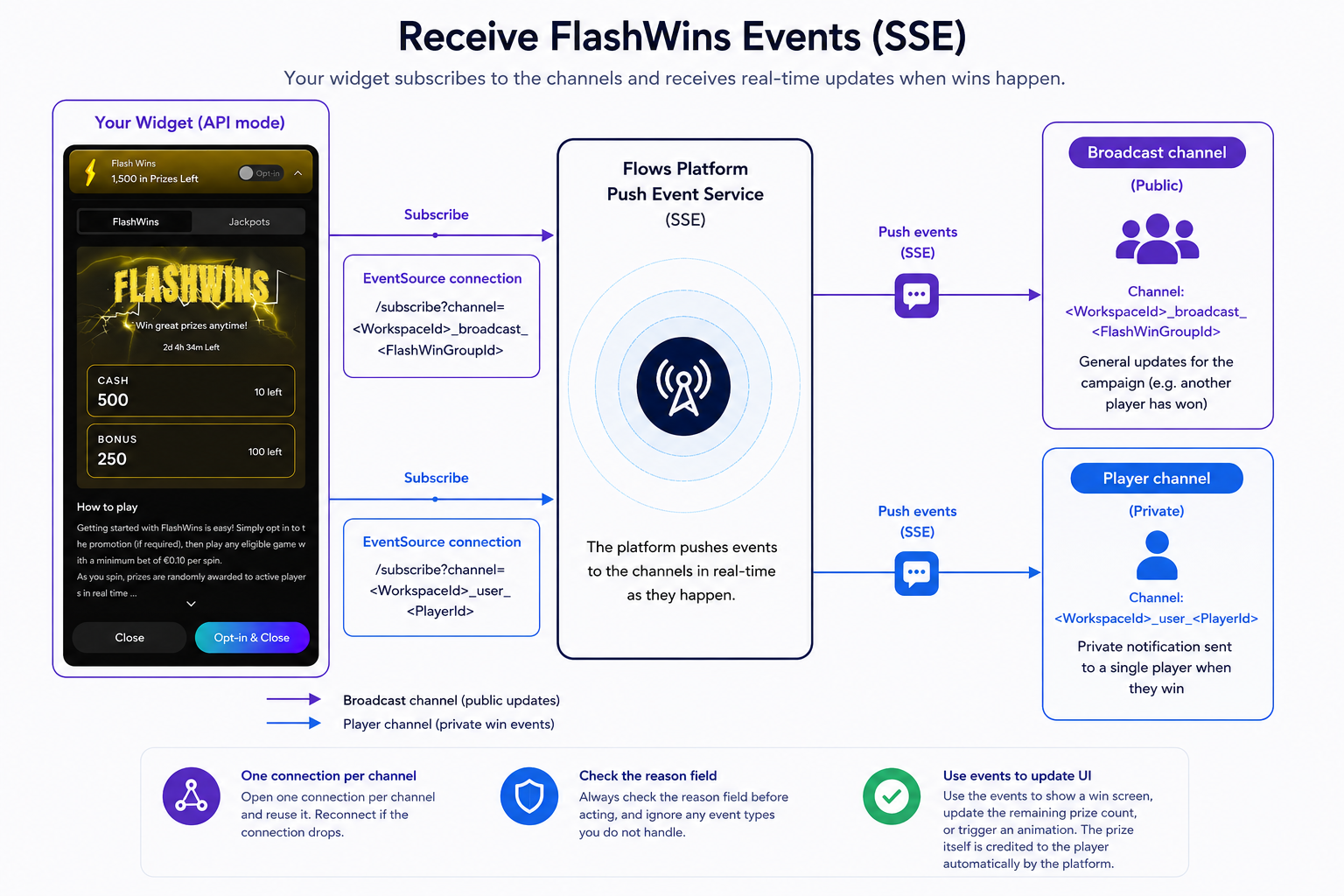
There are two kinds of channel:
- Broadcast channel: general updates for a campaign, such as a notification that another player has won.
- Player channel: a private notification sent to a single player when they win.
Sequence overview
- Your widget opens an
EventSourceconnection to each channel it needs. - The platform pushes events to those channels in real-time as they happen.
- Your handler reads each message, checks the
reasonfield, and updates the widget.
Subscribing
Subscribe with a standard EventSource connection. The channel name is built from your workspace ID and the campaign or player ID:
Broadcast: https://push-events.flows.world/subscribe?channel=<WorkspaceId>_broadcast_<FlashWinGroupId>
Player:    https://push-events.flows.world/subscribe?channel=<WorkspaceId>_user_<PlayerId>
Broadcast channel:
const broadcastSource = new EventSource(
  "https://push-events.flows.world/subscribe?channel=<WorkspaceId>_broadcast_<FlashWinGroupId>"
);
broadcastSource.onmessage = (event) => {
  const data = JSON.parse(event.data);
  // update the widget or show that another player has won
};
Player channel:
const playerSource = new EventSource(
  "https://push-events.flows.world/subscribe?channel=<WorkspaceId>_user_<PlayerId>"
);
playerSource.onmessage = (event) => {
  const data = JSON.parse(event.data);
  if (data.reason === "flashwin_won") {
    // show your win screen using data.value and data.currency
  }
};
Win event
When a player wins, the player channel carries a flashwin_won event with these fields:
Field | Meaning |
|---|---|
| The event type. For a win this is . |
| The campaign the win belongs to. |
| The current campaign instance. |
| The next campaign instance. |
| The prize amount. |
| The currency of the prize. |
| The channel the event was sent on. |
{
  "reason": "flashwin_won",
  "flashwin": "Ab12Cd34",
  "flashwinInstance": "Ab12Cd34_7",
  "flashwinNewInstance": "Ab12Cd34_8",
  "channel": "<WorkspaceId>_user_<PlayerId>",
  "currency": "EUR",
  "value": "50.00"
}
Broadcast events
The broadcast channel also carries general campaign events, such as a notification that another player has won. These follow the same model as Jackpots. The exact event names and example payloads are confirmed by the Flows team.
Best practices
- Open one connection per channel and reuse it. Reconnect if the connection drops.
- Always check the
reasonfield before acting, and ignore any event types you do not handle.
Use the events to show a win screen, update the remaining prize count, or trigger an animation. The prize itself is credited to the player automatically by the platform.
Related topics
- API Integration - fetch campaign data and manage opt-in