
API Integration
API Integration Setup
For developers who prefer to build their own front-end experience, our API integration mode provides the flexibility and control to fully customise the Jackpot experience. This integration requires calling our backend service FlowsPlay API and orchestrating interactions with the Jackpot system according to the sequence outlined below.
The API base URL is:https://api.flowsplay.world/game/v1/
Site Id
The Site ID is used with all API calls and can be found through the FlowsPlay admin panel under Site Settings.
Sequence Overview
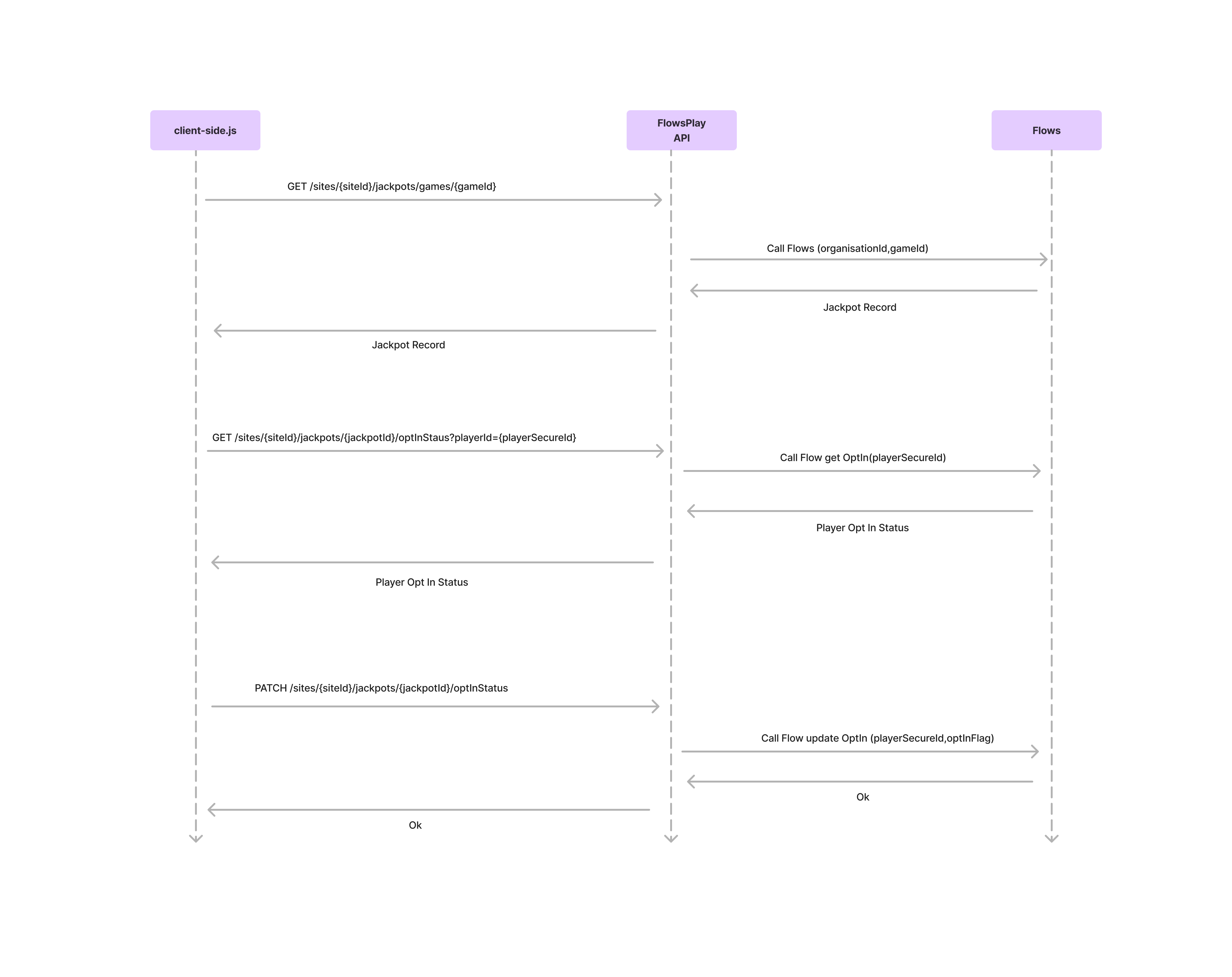
Here’s how your system should interact with FlowsPlay API to retrieve jackpot information and manage user opt-in status:
1. Fetch Jackpot Information for a Game
Endpoint:
GET /sites/{siteId}/jackpots/games/{gameId}
Purpose:
To retrieve the active jackpot record for a specific game.
Sequence:
Your client-side application makes a GET request to FlowsPlay API. The FlowsPlay API then calls the Flows service with the siteId and gameId to retrieve the current jackpot details.
The jackpot record is returned to the client.
2. Get Player Opt-In Status
Endpoint:
GET /sites/{siteId}/jackpots/{JackpotId}/optInStatus?playerId={playerSecureId}
Purpose:
To check whether a player is currently opted into the jackpot system.
Sequence: Your application queries FlowsPlay API with the player’s secure ID. The FlowsPlay API calls the Flows system to retrieve the player's opt-in status. The result is returned to the client.
3. Update Player Opt-In Status
Endpoint:
PATCH /sites/{siteId}/jackpots/{JackpotId}/optInStatus
Payload Example:
{
"playerId": "6B29FC40-CA47-1067-B31D-00DD010662DA",
"isOptedIn": true
}
Purpose:
To update a player’s opt-in preference.
Sequence: Your app issues a PATCH request to the FlowsPlay API with the desired opt-in flag. FlowsPlay API forwards this to the Flows service, which updates the player's opt-in status accordingly.
Notes:
All API requests require no authentication since they are expected to. be called directly from the front end
The PlayerSecureId must be unique and consistently used across calls for accurate state management. It is recommended to pass a secure player identification value such as a session ID which can then be mapped to the relevant PlayerId from Flows. It is recommended to discuss this further with Flows to find the optimal solution based on Data within the feeds and APIs avaialble
Swagger documentation for each API call can be found here:
https://api.flowsplay.world/game/swagger/index.html