
General
The General Settings section allows you to configure some base details for your jackpot. Below are explanations for each field to help you get started:
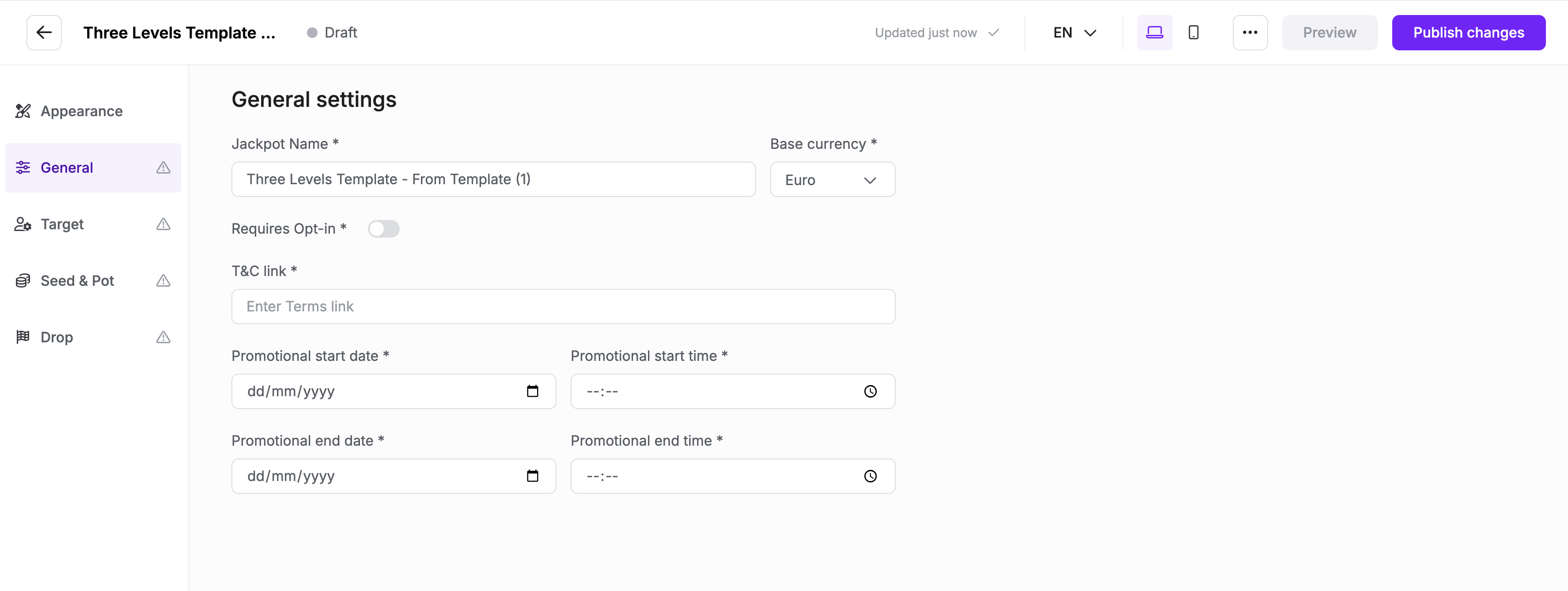
1. Jackpot Name
- What it is: This is the name of the jackpot you are setting up.
- How to use: Enter a descriptive name that will identify this jackpot template. This name is used internally to distinguish it from other templates.
2. Base Currency
- What it is: The currency used for this jackpot template.
- How to use: Select the appropriate currency from the dropdown menu (e.g., Euro, USD). Ensure that the currency matches the one used in your target region.
3. Requires Opt-In
- What it is: A toggle setting that determines if users must opt-in to participate in the jackpot.
- How to use: Turn this toggle ON if participants must explicitly opt-in before they can join the jackpot. Leave it OFF if opt-in is not required.
4. T&C Link
- What it is: A link to the terms and conditions for the jackpot.
- How to use: Enter the URL that points to your jackpot’s terms and conditions. This will be accessible to users for transparency and legal purposes.
5. Promotional Start Date
- What it is: The start date of your promotion or jackpot event.
- How to use: Click the date picker and select the start date for when the jackpot will be active.
6. Promotional End Date
- What it is: The end date of your promotion or jackpot event.
- How to use: Use the date picker to set the end date for the jackpot. This will define when the jackpot concludes.
7. Promotional Start Time
- What it is: The exact time your promotion or jackpot event will start on the selected date.
- How to use: Select the start time (hours and minutes) from the time picker.
8. Promotional End Time
- What it is: The exact time your promotion or jackpot event will end on the selected date.
- How to use: Select the end time (hours and minutes) from the time picker.